
Description
Best Testimonial Slider and Showcase plugin for WordPress website. It is a developer and user-friendly testimonial plugin that facilitates easy management of customer testimonials. Since it is fully responsive, it ensures that your testimonials appear in beautiful layouts on all devices.
👉 ShortCode Demo | Elementor Demo | Documentation | Get Pro 👈
This testimonial slider plugin is 100% customizable and allows you to generate shortcodes easily. You can summon the shortcodes onto any post or page on which you need to showcase testimonials in slider or grid view. It offers many variations of the grid and slider layouts.
You also get to customize the testimonials' fields, style, color, and general appearance. With this WordPress testimonial plugin, you can control whether the profile images on the testimonials you display are square or rounded. The Testimonial Slider and Showcase Pro allow you to customize the image size. It also lets you order testimonials by date, title, or id.
Here are the features that make this testimonial slider plugin so endearing:
🏆 Features of The Testimonial Slider and Showcase
You can make money from posting ads where users pay for each ad or for ad promotions, such as
-
Grid and Slider Layouts: When you use the free versions, you can use either of the 2 grid layouts and 2 slider layouts.
-
Isotope Filter [PRO]: With the isotope filter, the premium version of this plugin allows you to show and hide elements easily.
-
Shortcode Generator: With the help of the shortcode generator, you can call up a shortcode easily. This plugin lets you create unlimited shortcodes.
i. After filling your customers’ data in the corresponding fields, generate shortcodes using layout selection, fields’ selection, filtering, styling tab, and save the shortcode.
ii. Call the shortcode, copy it and then use it to add your testimonials to any page or post on your website easily.
-
Ordering Option: The ordering option that comes with this testimonial plugin enables you to order the testimonials you display by date, title, or id. What’s more, you get to order your testimonials by drag & drop. You can also order your testimonials by various taxonomy.
-
Image Size Control: When you have many large images on your website, your site will become slow. You get to limit the size of the images on your website with this plugin to avoid that. The PRO version gives you the option of a custom image size.
-
Style Control: With Testimonial Slider and Showcase, you can control the style in which your testimonials appear. You get to choose the colors and styles you want for your testimonial sections. It even allows you to display the testimonial profile images in round or square borders. The device-wise display control means that all your visitors will view the best versions of your testimonials.
-
Member Filter Option: This testimonial plugin allows you to display testimonials by department or individual member. Your testimonials can be displayed with various filter options for your members.
-
Translation Support: Whichever language your website uses, it won't conflict with this plugin because it is fully translatable. You get this plugin with ready POT files for various languages. You can translate your website very easily.
-
RTL Support: If you want a website that translates into any RTL language, this plugin totally supports that. It supports all RTL languages, including Hebrew, Persian, and Arabic. This means that your website can display the testimonials from all your users, regardless of their language preferences.
3 Easy Steps to Using Testimonial Slider and Showcase Plugin
When you have installed the plugin and are ready to display your testimonials as elegantly as possible,
here is how you go about it.
- Add all the members that you want to display along with all the necessary fields and profile images.
-
Generate the shortcode for the entire testimonial. Here is how you do it:
-
Step1: Layout
- You first choose the layout type from the three options available.
- You can then choose the layout style. The free version allows you to choose from 2 layout style options, while the pro provides an extra 9.
- You then get to edit other settings, including the number of desktop view columns, tab columns, and mobile columns.
- Next, you can switch pagination on or off.
- Choose the image thumbnail size.
- Edit the text that goes on the read more button.
- Choose whether you want to see circular or normal image display.
- Select the limit on the number of characters for the testimonials
- You then choose whether you want to go with the Bootstrap default margin or not at all.
- The PRO plugin allows you to then choose between going with the masonry grid or even grid.
- With the PRO plugin, toggle the detail page link on or off.
- The PRO plugin lets you choose the default preview image.
-
Step 2: Filtering
- You choose the only comma-separated values that should be included.
- Choose the list of post IDs that you want to exclude, while still using commas to separate the values.
- Select the limit on the number of posts to display. If you set to empty, you’ll showcase all your found posts.
- With the PRO plugin, you then select the categories you want to filter. Leaving the space blank will showcase all your categories.
-
The PRO plugin lets you select the tags you want to use in the filters.
-
The ‘Taxonomy Relation’ feature in the PRO plugin lets you choose more than one taxonomy-like tag, category, category and tag, or tag and tool.
- Choose the ordering criteria, for instance ordering by date.
- Select whether you want the ordering to be descending or ascending.
-
Step 3: Fields selection
- When checking the field that you want to display, you check the fields that you want to display. Your options include, author, author image, testimonial, read more, designation, company, location, rating, video, social media, and social share.
- If you have the PRO version of the plugin, you can choose the social share item sources you want to display. The checkboxes include Facebook, LinkedIn, Twitter, Pinterest, and Email.
-
Step 4: Styling
- Choose the parent class you want for adding the custom CSS.
- Select the color schemes you want for the primary, container background, and item background.
- Choose colors you want for your button background, hover background, hover background, text, hover text, and border.
- Select the number of pixels you want for the gutter or padding gap.
- Choose the overlay style, including the overlay color, overlay opacity, and overlay top padding.
- Select the image border style width, color, and style.
- Select the style for writing the author’s name, author’s bio, rating, and social, all of which let you set the color, font size, weight, and alignment.
- Choose the overall testimonial style, including color, font size, font style, weight, and alignment.
-
3. Now, summon the shortcode in the page or post you want it to go using Gutenberg or Elementor addon. Alternatively, just copy the shortcode and paste it on the page or post.
🏆 Available Testimonial Fields
The following are the fields that this plugin allows you to have on your testimonials:
- Title or name of the user
- Testimonial content, which is the user's comments
- The profile image of the user
- The designation of the user
- The company name
- The user rating
- Video [Pro]
- Social [Pro]
🏆 Features of the Pro Version of the Testimonial Slider and Showcase
-
Layouts: The premium version of this plugin comes with 9 additional grid layouts, 11 sliders, and 6 isotope filter layouts.
-
Detail Page Popup: The testimonial detail page can have multiple, single, or smart popups.
-
Grid Filter: You can use various grid layouts for filtering the testimonials.
-
Filter Preview: The premium plugin also lets you filter your testimonials by categories or tags.
-
Layout Preview: Before taking your creation or customization work live, you can view the preview easily.
-
Disable Show All Button: You can hide or display the Show All button when your testimonials are in an isotope or filter layout. You can also make the department default.
-
Ajax Pagination: The premium version supports Ajax load more, load more on scroll, and number pagination.
-
Masonry Grid: You can showcase your testimonials with the elegance of the masonry grid.
-
Margin Control: You have control over where the margins of the testimonials start and stop.
-
Gutter/ Padding Control: You can customize the size of the gutter margins or inter-column space.
Fully translatable
- POT files included (/languages/)
Screenshots
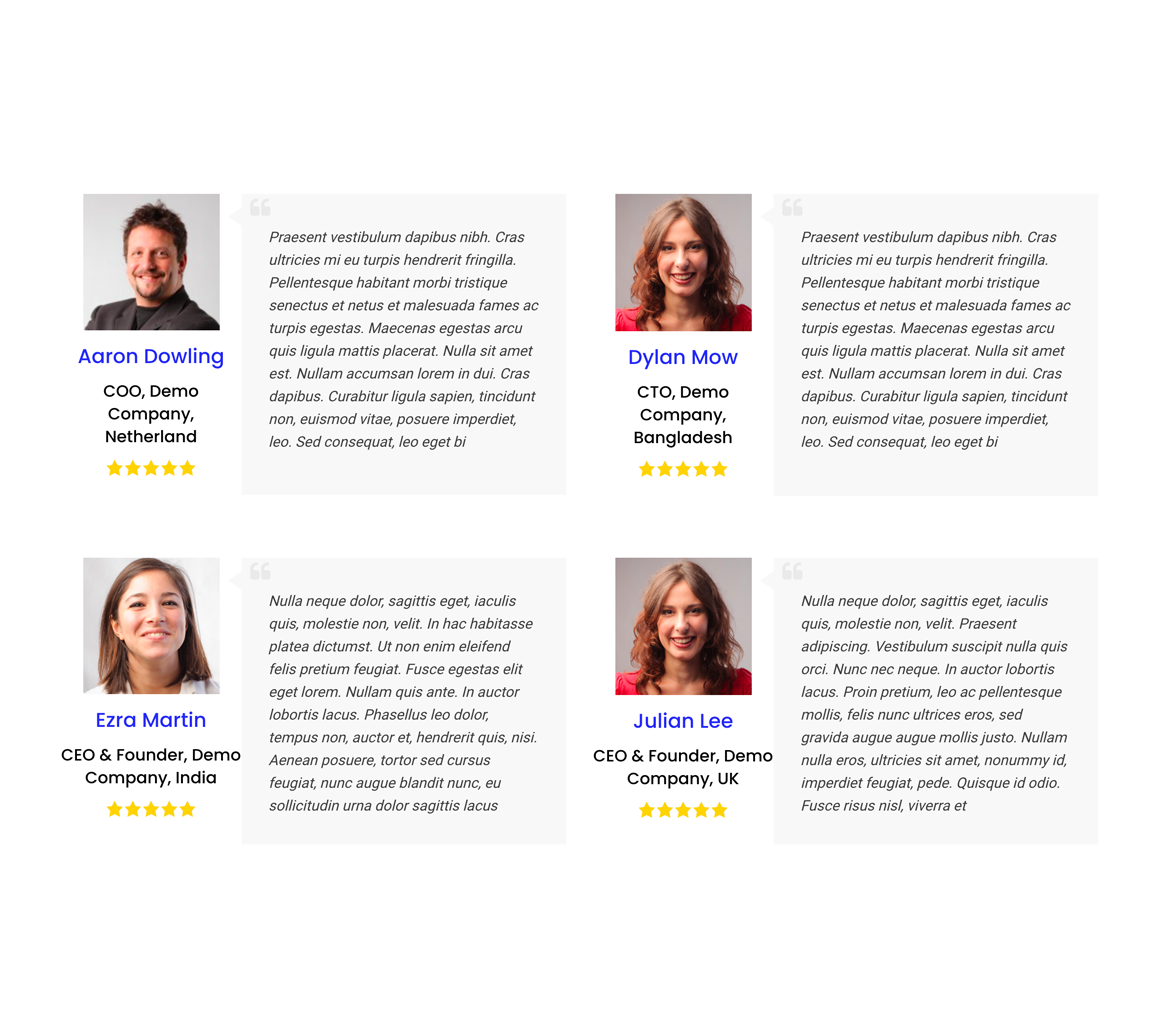
Grid Layout 
Slider Layout 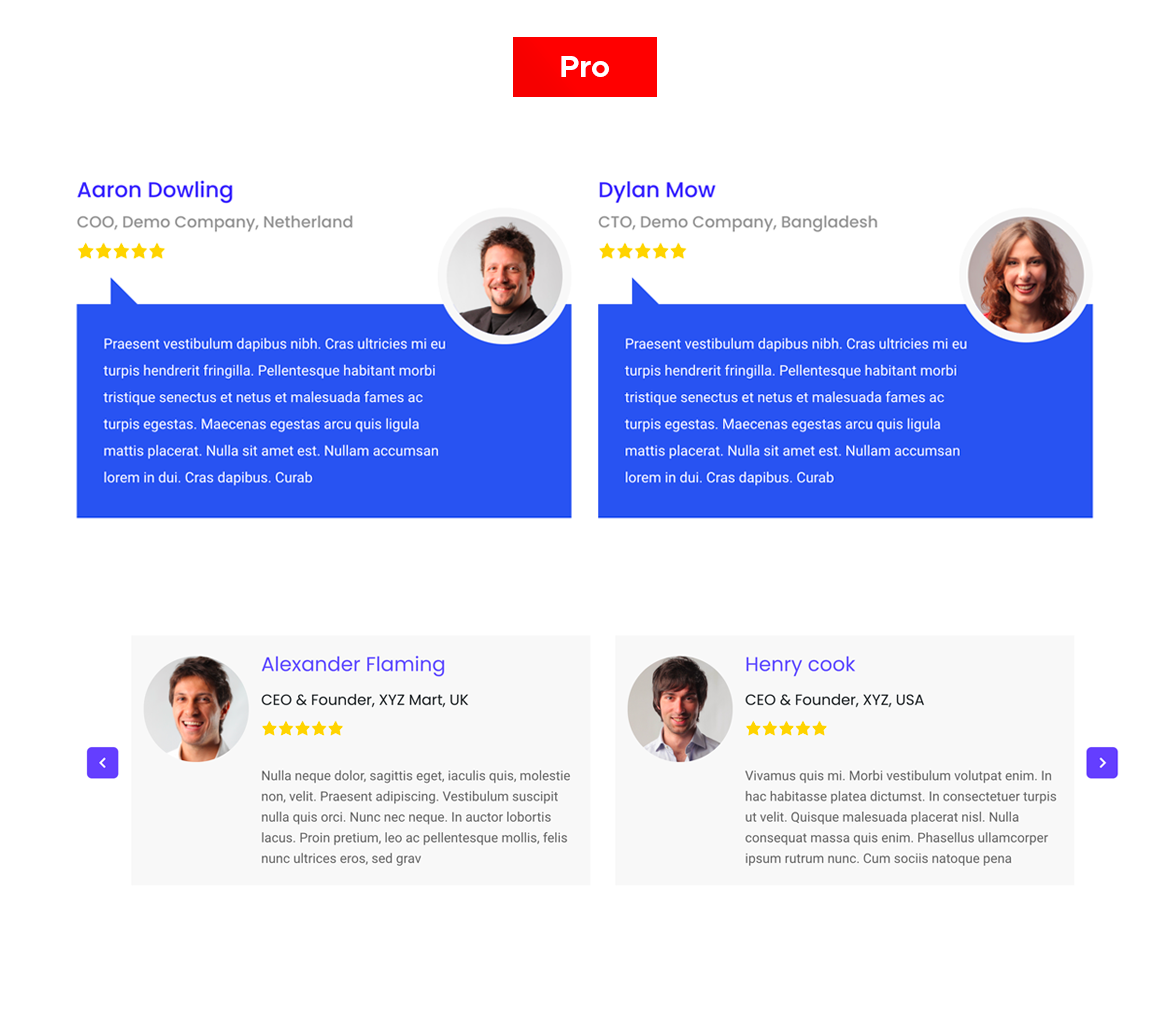
Grid Layout pro 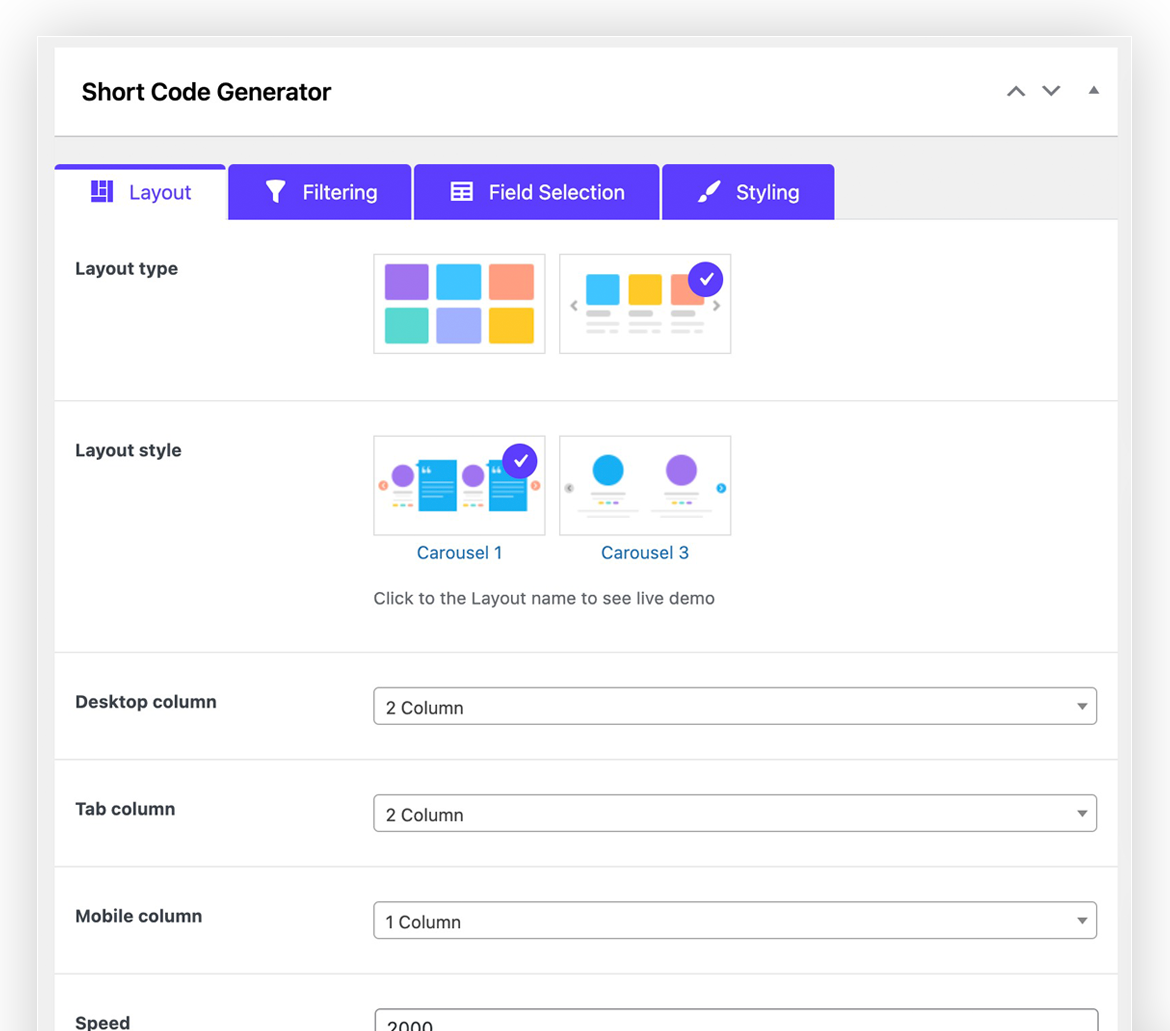
Layout selection 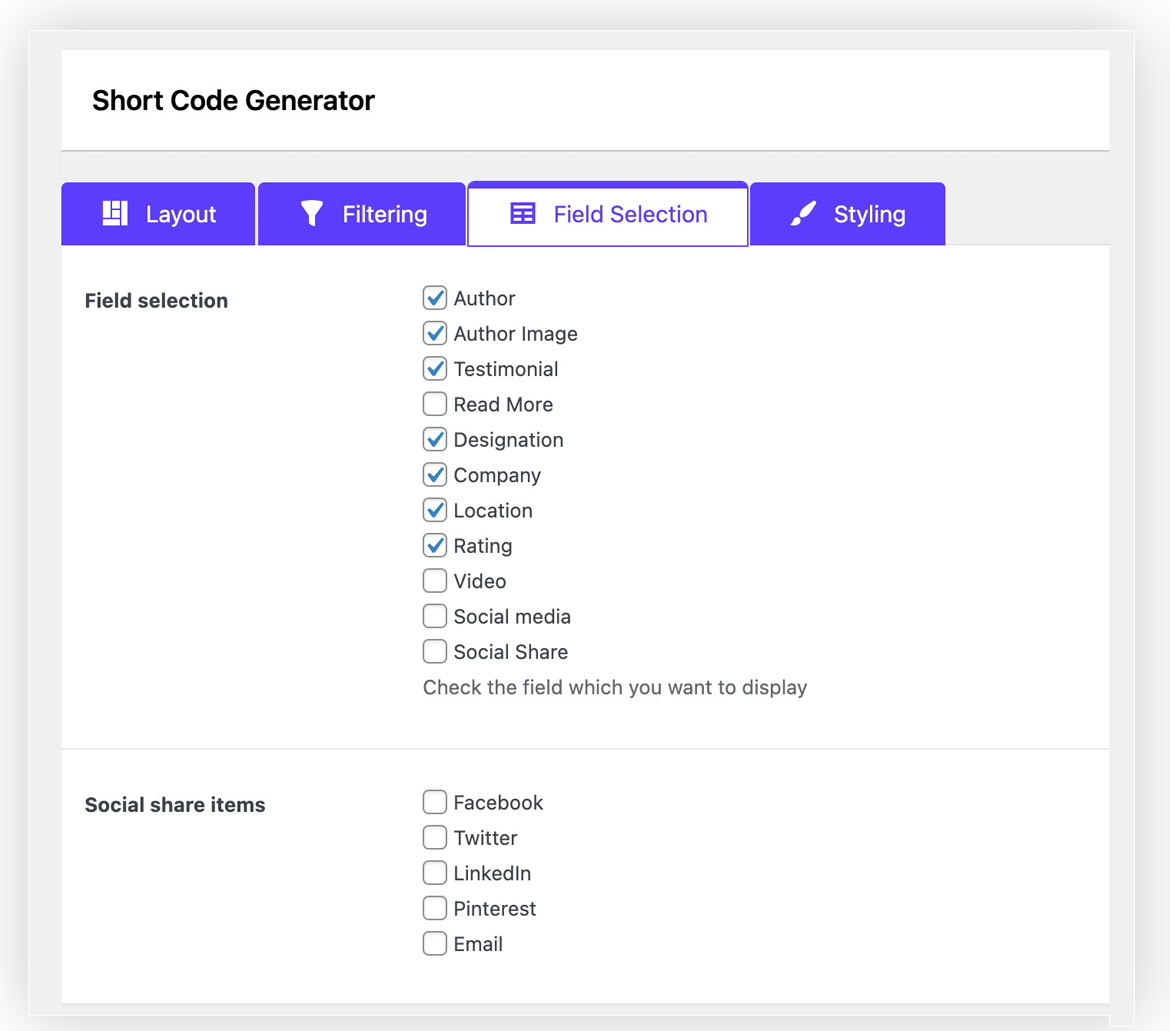
Field selection 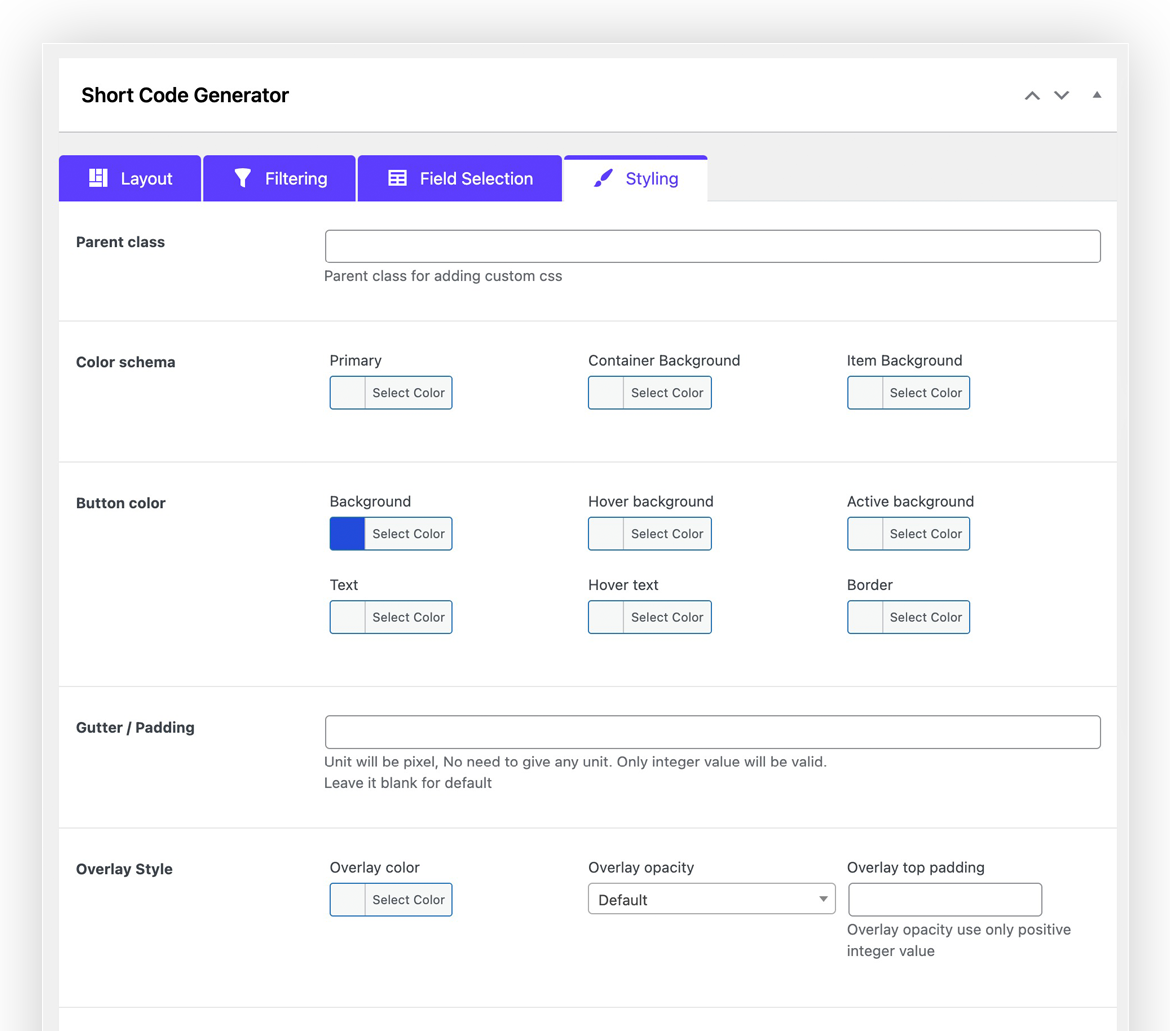
Styles
Blocks
This plugin provides 1 block.
- Testimonials Slider and Showcase
Installation
- Unzip the downloaded
testimonial-slider-showcasezip file - Upload the ‘testimonial-slider-showcase’ folder and its contents into the
wp-content/plugins/directory of your WordPress installation - Activate
tlp-teamfrom Plugins page
Requirements
- WordPress version: >= 4.4
- PHP version: >= 7.2
FAQ
-
How to Use Testimonial Slider Plugin?
-
- Go to
Testimonial Slider > Add New testimonial - Go to
Testimonial Slider > Shortcode Generator - Go to page or post editor click Testimonial Shortcode button and select a shortcode from dropdown list and insert shortcode.
- Go to
-
Is Testimonial Showcase Plugin support Grid Layout?
-
- Yes it is support both grid and slider layouts
-
Can I add unlimited shortcode?
-
- Yes you can add unlimited shortcode
-
Is Testimonials Slider plugin will work with my theme
-
- Yes it will work all standard theme. If face any issue create ticket in our website we will help.
-
If I update PRO is my data lost?
-
- No data will be same as it is but you may need to save shortcode generator to get PRO features.
-
How Can I get Support ?
-
- Please mail us at
support@radiustheme.com - We provide
12 hours live support
- Please mail us at
Reviews


Contributors & Developers
“Testimonial Slider” is open source software. The following people have contributed to this plugin.
Contributors
Translate “Testimonial Slider” into your language.
Interested in development?
Browse the code, check out the SVN repository, or subscribe to the development log by RSS.
Changelog
2.3.10 (April 17, 2023)
Updated: Proper sanitization and escaping for all files.
Fixed: Some security bugs.
2.3.9 (March 25, 2023)
- Fixed: Shortcode Query Issue
2.3.8 (February 26, 2023)
- Fixed: Some Issue
2.3.7 (February 15, 2023)
- Fixed: Authorization Issue
2.3.6 (February 13, 2023)
- Fixed: Image Alt Tag Issue
2.3.5 (November 20, 2023)
- Added: WordPress 6.4 version compatible
- Added: Twitter new icon
2.3.4 (September 5, 2023)
- Added: WordPress 6.3 version compatible
- Added: PHP 8.2.0 version compatible
2.3.3 (June 1, 2023)
- Fixed: Some Css issue & responsive issue
2.3.2 (April 17, 2023)
- Fixed: Some Css issue & responsive issue
2.3.1 (March 13, 2023)
- Fixed: Elementor slider compatibility issue.
- Fixed: Some slider CSS.
2.3.0 (January 09, 2023)
- Added: 3 new social profile support (Skype, Whatsapp & Telegram).
- Fixed: Some design issues in frontend submission form.
2.2.10 (December 15, 2022)
- Fixed: A security bug.
- Fixed: Shortcode preview issue.
2.2.9 (November 18, 2022)
- Improved: Some styles.
2.2.8 (November 08, 2022)
- Fixed: Some errors with PHP 8.0 environment.
2.2.7 (September 19, 2022)
- Fixed: Proper sanitization and escaping for title field.
2.2.6 (July 27, 2022)
- Fixed: Parse error in the earlier PHP versions.
2.2.5 (July 26, 2022)
- Updated: Proper sanitization and escaping for all files.
- Updated: All vendor libraries.
- Updated: Replaced Font Awesome icon library with Fontello.
2.2.4 (April 15, 2022)
- Updated: Proper sanitization and escaping for all files.
2.2.3 (April 15, 2022)
- Fixed: Some errors with Gutenberg block.
2.2.2 (February 22, 2022)
- Fixed: Some errors with PHP 8.0 environment.
2.2.1 (February 16, 2022)
- Fixed: Pagination not working on front page.
2.2.0 (January 31, 2022)
- Added: Elementor Testimonial Grid Layout widget.
- Added: Elementor Testimonial Slider Layout widget.
- Added: Elementor Testimonial Isotope Layout widget.
- Fixed: Grid height issue on Grid Layouts.
2.1.3 (January 14, 2022)
- Updated: Replaced Slick Slider with Swiper Slider.
- Fixed: Ordering bug Fixed.
- Fixed: Profile Image alt text issue.
2.1.2 (Novembar 23, 2021)
- Responsive Issue fix
2.1.1
- Added: Layout Preview in Shortcode
2.0.1
- Fixed: Old PHP version syntex error
2.0.0
- Major update in code structure
- Improved features and functionality
1.2.6.3
- Added name, description color settings
1.2.6.2
- Add WordPress 5.7 Support
1.2.6
- Compatible with latest WP
1.2.5
- Update UI
1.2.4
- Remove jquery conflict
1.2.3
- Add Elementor and GutenBurg support
1.2
- Remove extra span tag
1.1
- Widget issue
1.0
- Initial load of the plugin.