
Description
FeastBell keeps the feasts and events of your church, parish, village or community in one place and shows the next one on your site. Movable feasts are counted from Easter, Orthodox or Western, so their dates change every year by themselves.
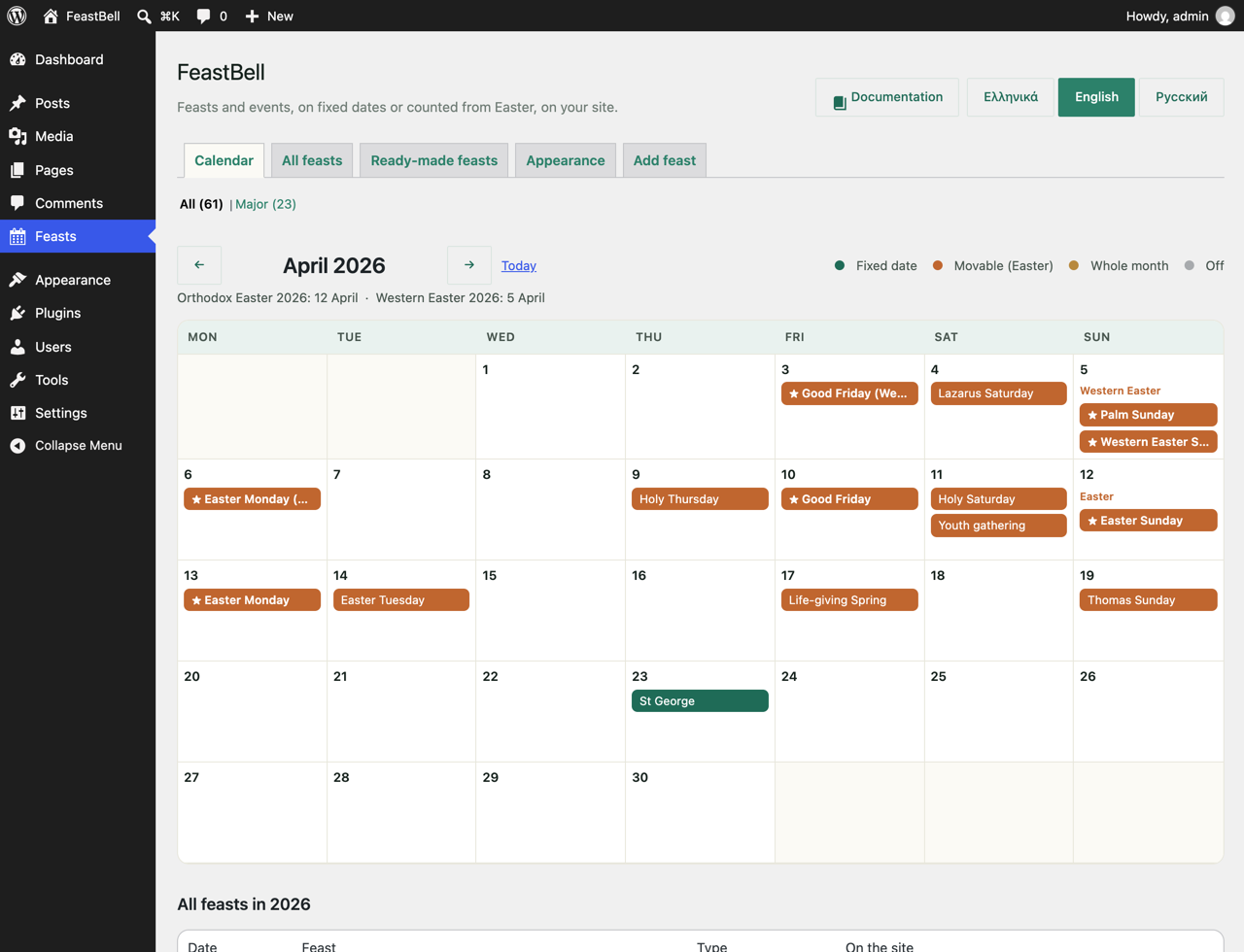
- Monthly calendar in wp-admin, with the whole year listed below it
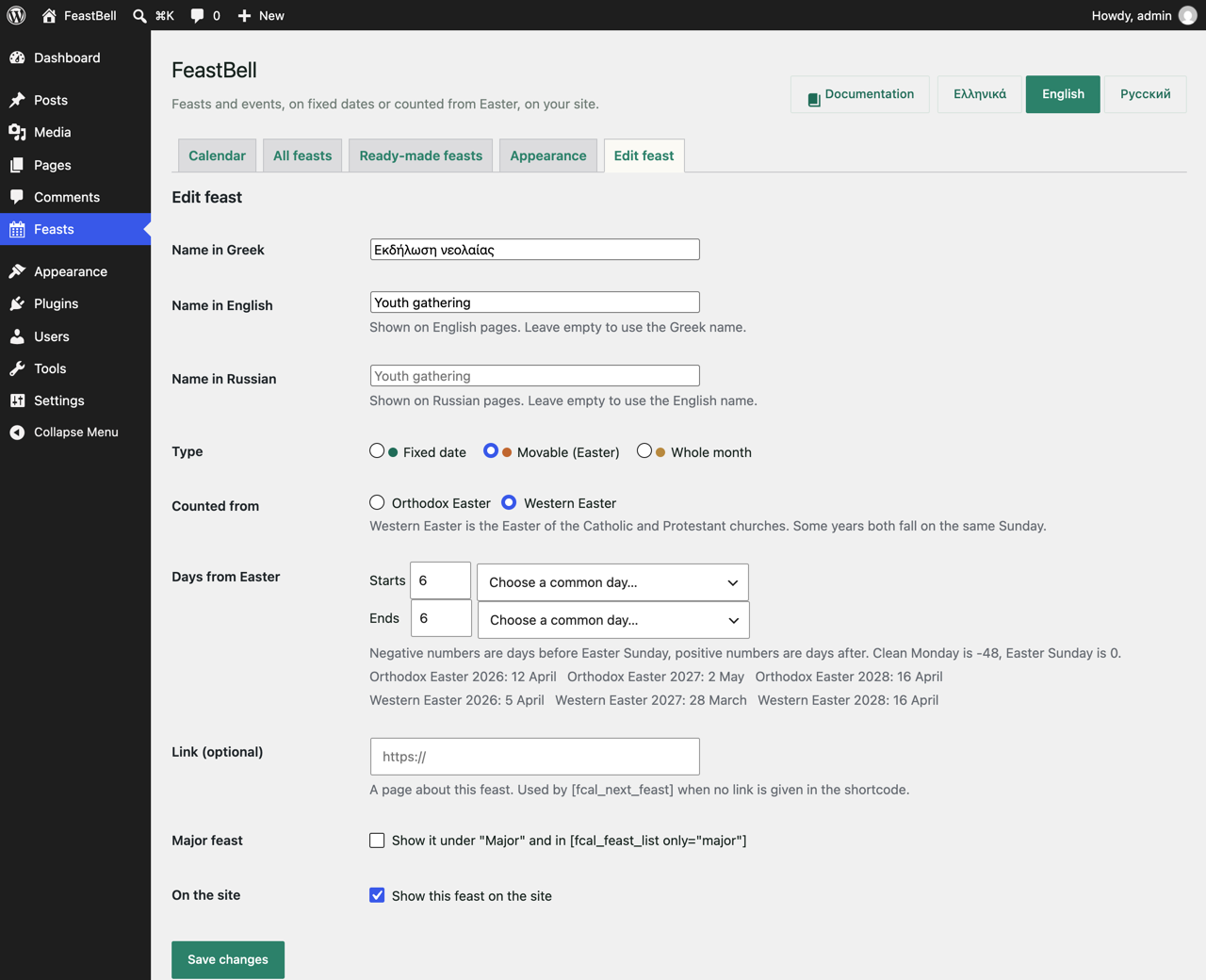
- Fixed feasts and events (same date every year, one or more days), movable feasts (days before or after Easter) and whole-month events
- Orthodox Easter and Western (Catholic and Protestant) Easter: choose for every movable feast which Easter it is counted from
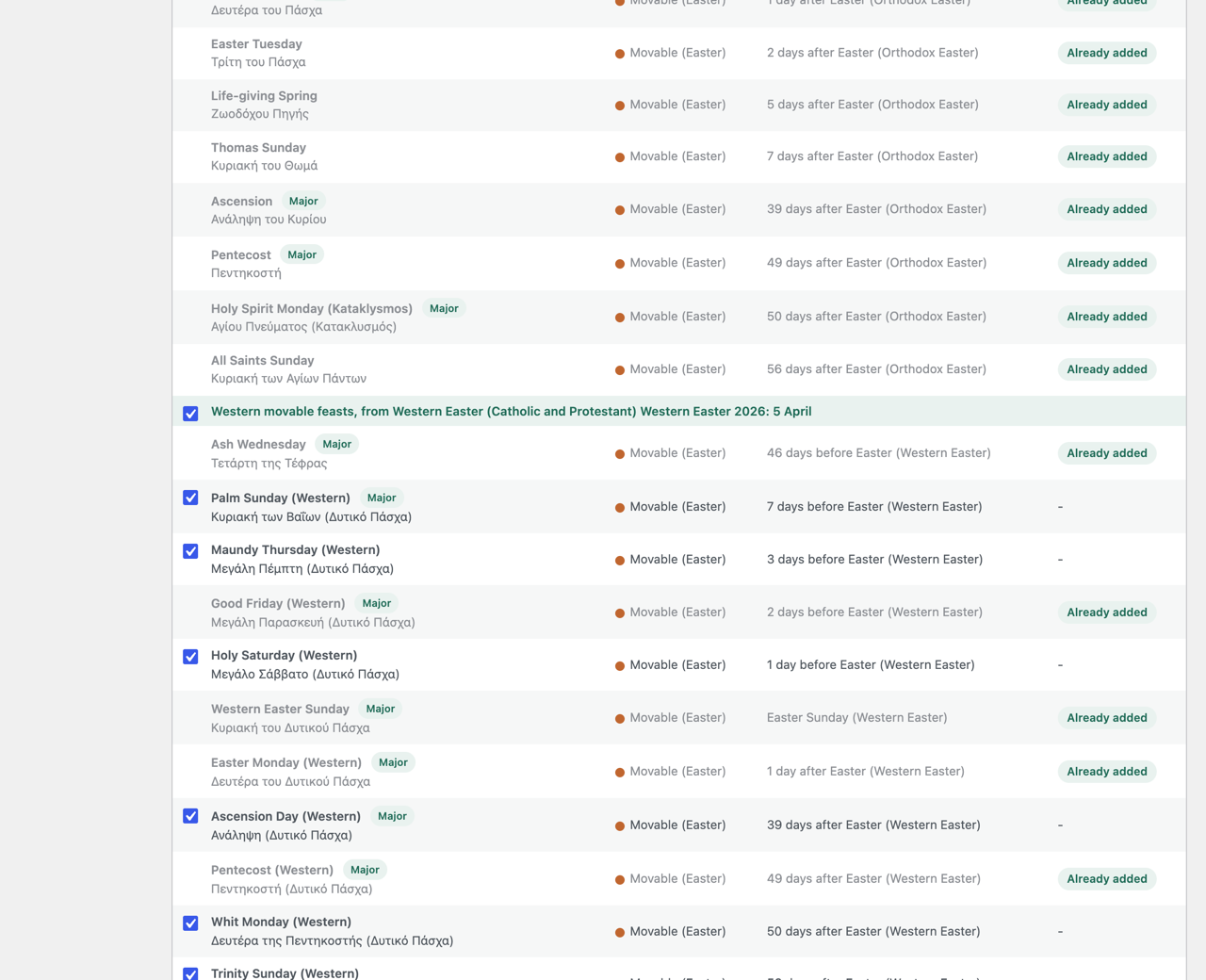
- Ready-made feasts to tick and add: the Orthodox feasts celebrated in Cyprus, and the Western movable feasts (Ash Wednesday, Palm Sunday, Good Friday, Easter, Ascension, Pentecost, Corpus Christi and more)
- “All” and “Major” views: major feasts are the great feasts of the Lord and of the Virgin Mary, and the religious public holidays
- Turn any feast on or off. A feast that is off stays in the list but does not show on the site
- Change the date of a feast for one year only, or skip it for one year. Other years keep the normal rule
- One-time events: set “Only in year” and the event shows in that year only
- Optional time per event (“19:00” or “19:00-22:00”), shown next to the date
- A link per language: the main link, or a link in English and Russian. On Polylang or WPML sites a link to a post or page opens its translation automatically
- “Feasts” or “Events” wording on the site, for parishes or for municipalities, councils and schools
- Works behind page caches: today is marked with the visitor’s clock, and pages that show FeastBell are refreshed every night
- Greek, English and Russian name for every feast, for multilingual sites
- Admin screens in Greek, English or Russian, switched from the top of the page
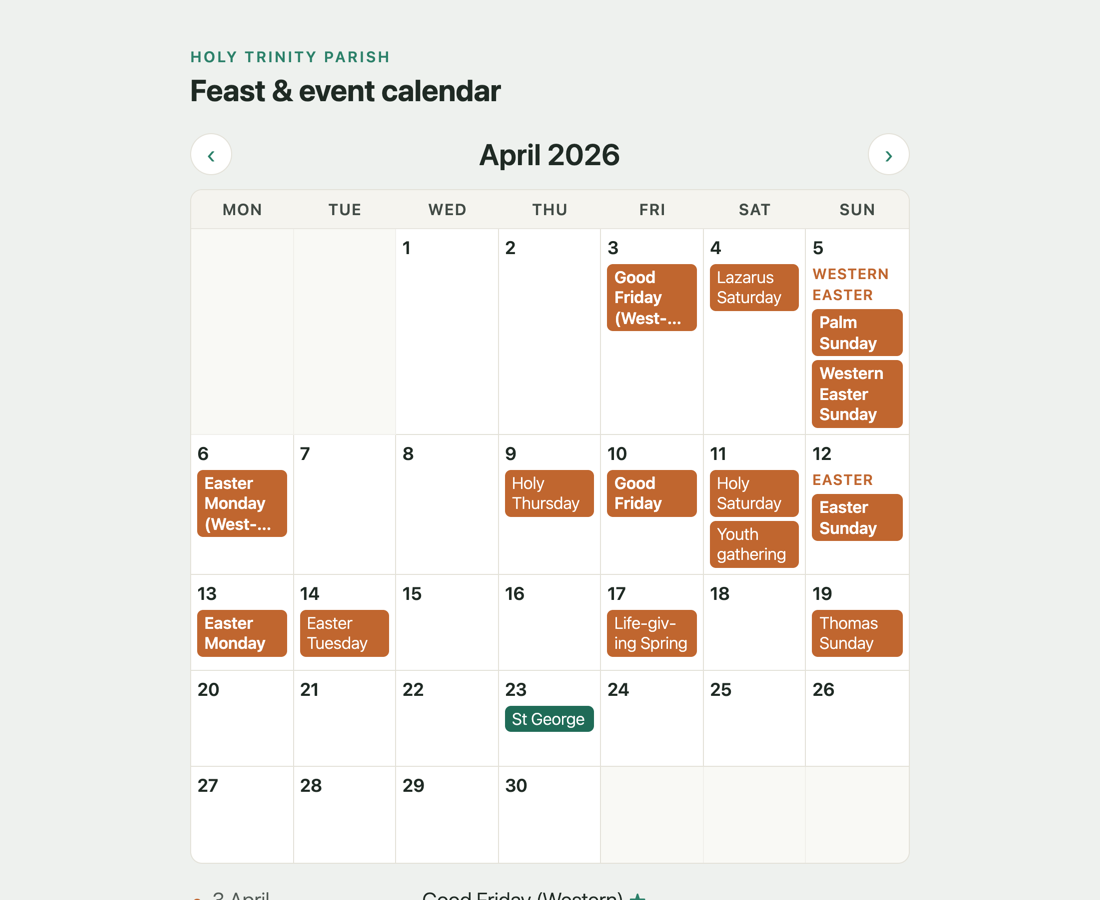
- A month calendar for the site, with previous / next month, as a block, a shortcode or an Elementor widget
- Blocks for the block editor: FeastBell Calendar, Next feast and Feast list, with a live preview
- Ready-made designs (Classic green, Burgundy and gold, Aegean blue, Night, Minimal) with a picture of each one and the shortcode to copy
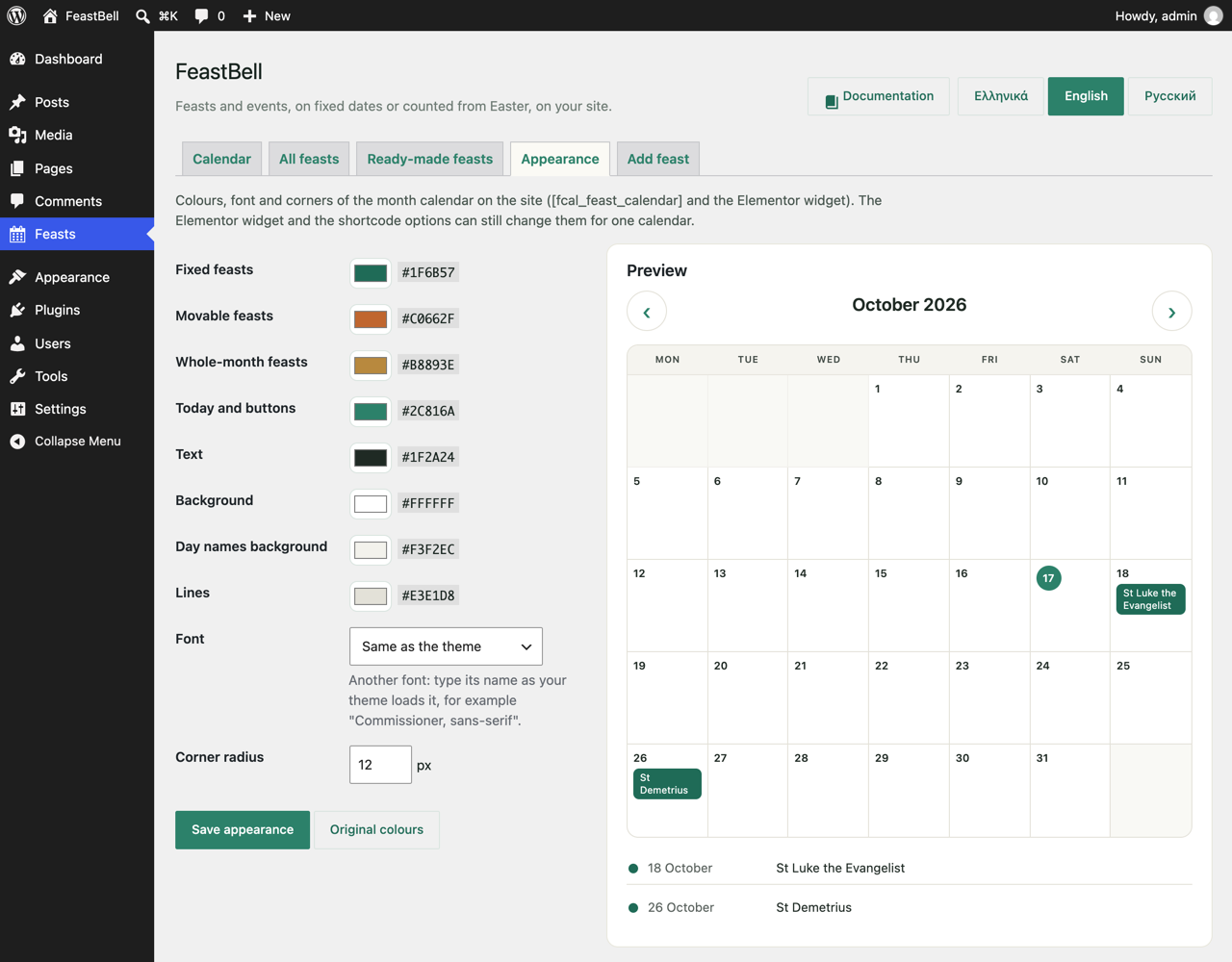
- Appearance settings: colours, font and corners of the calendar, with a live preview
Blocks
In the block editor add FeastBell Calendar, Next feast or Feast list. Choose the design, the feasts, which Easter to mark and the language in the block settings.
Shortcodes
[fcal_next_feast]the feast happening today, else the shortest one going on, else the next one. Its name links to the feast’s page. Options:link=""(adds an “All feasts” link),date="short"(“Sat 28/11”),lang="el",lang="en"orlang="ru",only="major",class=""[fcal_feast_list count="7"]the coming feasts as a list. Options:count,lang,only="major",class[fcal_feast_calendar]the month calendar. Options:month="2026-12",only="major",lang,nav="no",list="no",easter="yes"(Orthodox Easter),easter="western",easter="both"oreaster="no",design="burgundy"(alsoclassic,sea,night,minimal),full="yes"(whole names on desktop),class, and for one calendar onlycolor_fixed,color_easter,color_month,color_accent,color_text,color_bg,color_head,color_border,font,radius
On Elementor sites there is also a “FeastBell” widget with colour and typography controls.
The page language comes from Polylang or WPML when they are active, otherwise from the site language.
For developers
fcal_capabilitywho may manage feasts (defaultedit_pages)fcal_front_langthe language of the site textsfcal_front_textthe site texts (“Next feast”, “Happening now”, “All feasts”)fcal_librarythe list of ready-made feasts offered for addingfcal_front_cssreturn false to drop the default site stylesfcal_docs_urlsthe Documentation linksfcal_designsthe ready-made calendar designsfcal_feast_link( $url, $feast, $lang )the link of a feast in one languagefcal_dailydaily event at 00:05 site time that refreshes cached pages showing FeastBellfcal_purge_url( $url )runs for each page purged byfcal_daily, for cache plugins FeastBell does not knowfcal_purge_urls( $urls )the list of pages purged byfcal_daily
Screenshots


Blocks
This plugin provides 3 blocks.
- FeastBell Calendar The month calendar of your feasts and events, with previous and next month.
- Next feast The next feast or event, or the one happening now.
- Feast list The coming feasts and events as a list.
Installation
- Plugins > Add New Plugin, search for FeastBell, click Install Now and then Activate.
- The major Orthodox feasts of Cyprus are added to the calendar the first time. Remove the ones you do not need, or tick Western feasts in “Ready-made feasts”.
- Open Feasts in the admin menu.
Documentation: https://www.webquicky.com/plugin/feast-calendar-documentation/
FAQ
-
Can I use it for Catholic or Protestant feasts?
-
Yes. Every movable feast can be counted from Orthodox Easter or from Western Easter. The “Ready-made feasts” tab has the Western movable feasts ready to tick and add, and the site calendar can mark Orthodox Easter, Western Easter or both.
-
Is there a block for the block editor?
-
Yes. FeastBell Calendar, Next feast and Feast list. The Designs tab shows every ready-made design with the shortcode to copy, and the same designs are in the calendar block settings.
-
Can I add events that are not feasts?
-
Yes. Any event with a fixed date (one or more days), a whole month, or a date counted from Easter can be added, for example a village festival, a fair or a yearly gathering.
-
What happens to my feasts if I deactivate the plugin?
-
Nothing. Feasts and yearly changes stay saved and come back when you activate it again.
-
St George falls before Easter this year. What do I do?
-
When 23 April falls before Easter, St George is celebrated on Easter Monday. Open the calendar, click the feast and use “Change date this year”.
-
Does it work with Polylang or WPML?
-
Yes. On multilingual sites the feast name and the calendar follow the page language. Every feast has a Greek, English and Russian name. Without a multilingual plugin the site language is used.
-
Why does the plugin include its own translation files?
-
The admin screens have their own language switch (Greek, English, Russian) for each user, independent of the WordPress language, so the plugin loads its bundled Greek and Russian files for that switch.
-
Does it send any data anywhere?
-
No. FeastBell does not contact any external server and does not collect any data. Everything is stored in your own WordPress.
Reviews
There are no reviews for this plugin.
Contributors & Developers
“FeastBell – Feast & Event Calendar” is open source software. The following people have contributed to this plugin.
Contributors
Translate “FeastBell – Feast & Event Calendar” into your language.
Interested in development?
Browse the code, check out the SVN repository, or subscribe to the development log by RSS.
Changelog
1.1.1
- Fix: automatic link translation on Polylang/WPML pages in a non-default language.
1.1.0
- New: blocks for the block editor: FeastBell Calendar, Next feast and Feast list.
- New: a link per language (link_en, link_ru); on Polylang/WPML sites the main link opens its translation. Calendar, next feast and feast list all use it, and the feast list now links names.
- New: one-time events (“Only in year”), shown in that year only, with “2026 only” / “Past” badges in the feast list.
- New: optional time per event, shown in the calendar list, the cell tooltip, the next feast and the feast list.
- New: “Feasts / Events” wording in Appearance.
- New: date=”short” for the next feast, full=”yes” (and an Elementor switch) for whole names on desktop.
- New: today is marked with the visitor’s clock in the site timezone, and pages that show FeastBell are purged every night at 00:05 (SiteGround, LiteSpeed, WP Rocket, W3 Total Cache, WP Super Cache, or fcal_purge_url).
- Changed: [fcal_next_feast] shows a one-day feast happening today first (labelled “Today”), then the shortest event going on, then the next one.
- Changed: [fcal_next_feast] without link=”” no longer prints an “All feasts” link pointing to the feast’s own page; the feast’s name is now the link. Sites that relied on the old link will find it on the name.
- Fixed: changing month on a page in another language (language “The page language”) switched the calendar to English.
- Fixed: month arrows off-centre, and invisible on hover in some themes; weekday names too small.
- The Elementor widget is marked as dynamic content, so Elementor’s element cache never serves an old month.
- New: Designs tab with ready-made designs, a picture of each one and the shortcode to copy.
- New: design option for the calendar shortcode: classic, burgundy, sea, night, minimal.
- New: Add feast button at the top of every screen, and every screen in the admin menu.
- New: “Show it on your site” box with copy buttons for the shortcodes.
1.0.0
- First release.